
Yelp (business): Add Link-in-Bio
Add your RateCards link to your Yelp for business profile. This replaces websites for many types of professionals. Yelp can drive traffic to your RateCards services so you can sell more.
💡 Tip: Boosting traffic to your RateCards link increases sales of your services.
How to add your RateCards profile to your Yelp (for business) profile
On desktop web browser: Here’s how to add a link to your Yelp business profile:
- Open the Yelp website on your device
- Complete your Business Profile
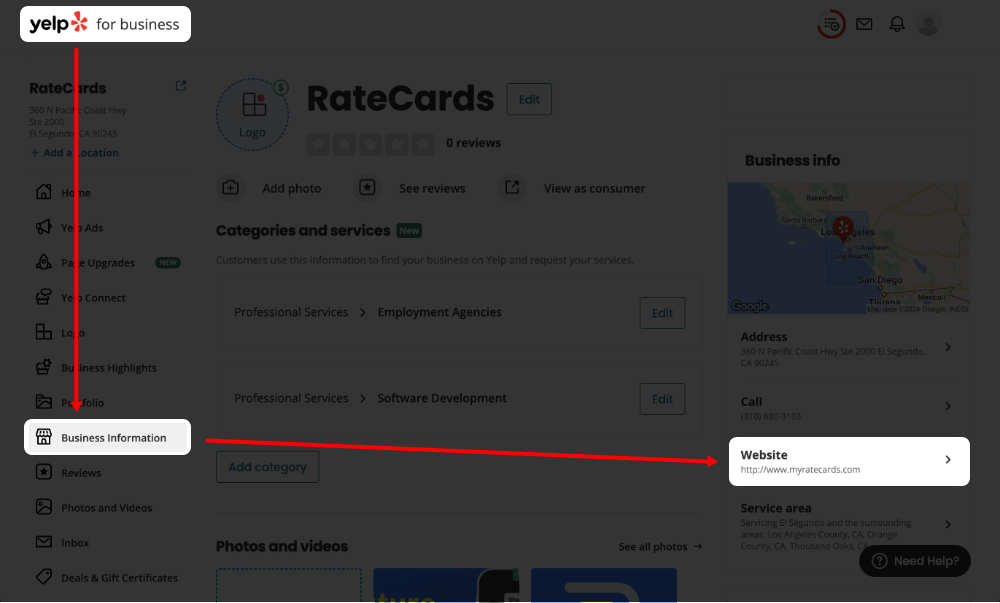
- After completing your business profile, in the left column tap the ‘Business information’ row
- On the right of the screen; tap the ‘Website‘ row
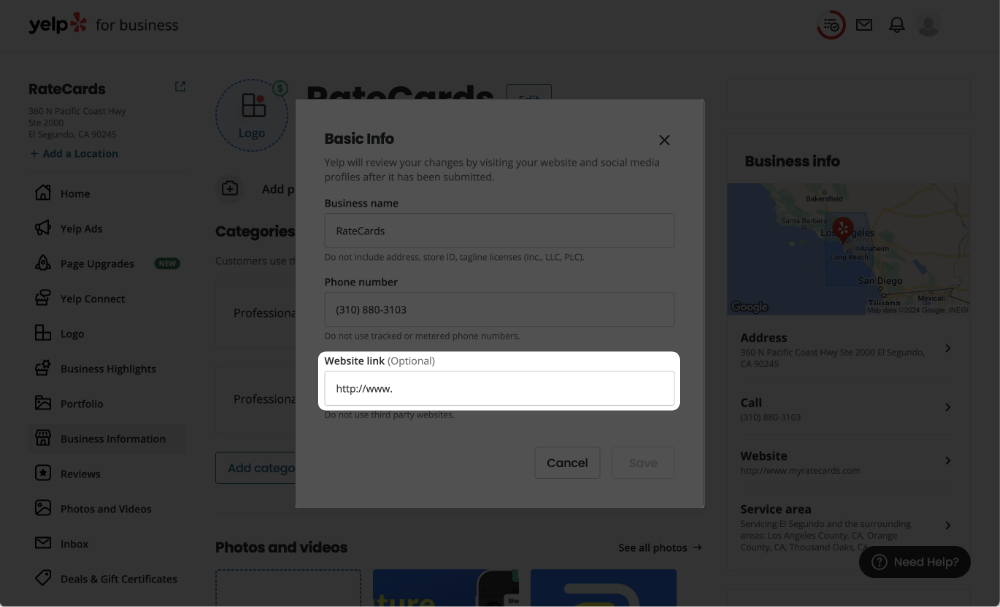
- A pop-up opens, select the ‘Website link‘ text field
- Paste in the URL from your RateCards profile. Learn more.
- Hit the ‘Save‘ button
FAQ
Location settings.
Make sure your location settings are setup in Yelp. This helps people find services like yours.
How do I get more traffic from Yelp to my RateCards account?
Promoting you Yelp profile can drive more engagement and help sell your services on RateCards. Follow Yelp’s rules for boosting your profile.
Related Articles
How-Tos
LinkedIn: Add link-in-bio
X (Twitter): Add link-in-bio
Reddit: Add link-in-bio
Instagram: Add link-in-bio
TikTok: Add link-in-bio
YouTube: Add link-in-bio
Pinterest: Add link-in-bio
Facebook: Add link-in-bio
Create your profile
Add rate cards
Request payment

Payments + Booking App for Service Providers
Product
How it Works
Use Cases
Resources
Help Center
Getting Started
Earn w/ RateCards
Account Support
How-Tos
Company
About Us
Blog
Privacy Policy
Terms of Service
Contact Us