
Instagram: Add Link-in-Bio
Add a link to the introduction section of your Instagram bio, located at the top of your profile. Use this to increase traffic to your RateCards services in order to sell more.
💡 Tip: Boosting traffic to your RateCards link increases sales of your services.
How to add your RateCards profile to your Instagram bio
On mobile device: Here’s how to add a link to your Instagram bio:
- Open the Instagram app on your device
- Tap on your account
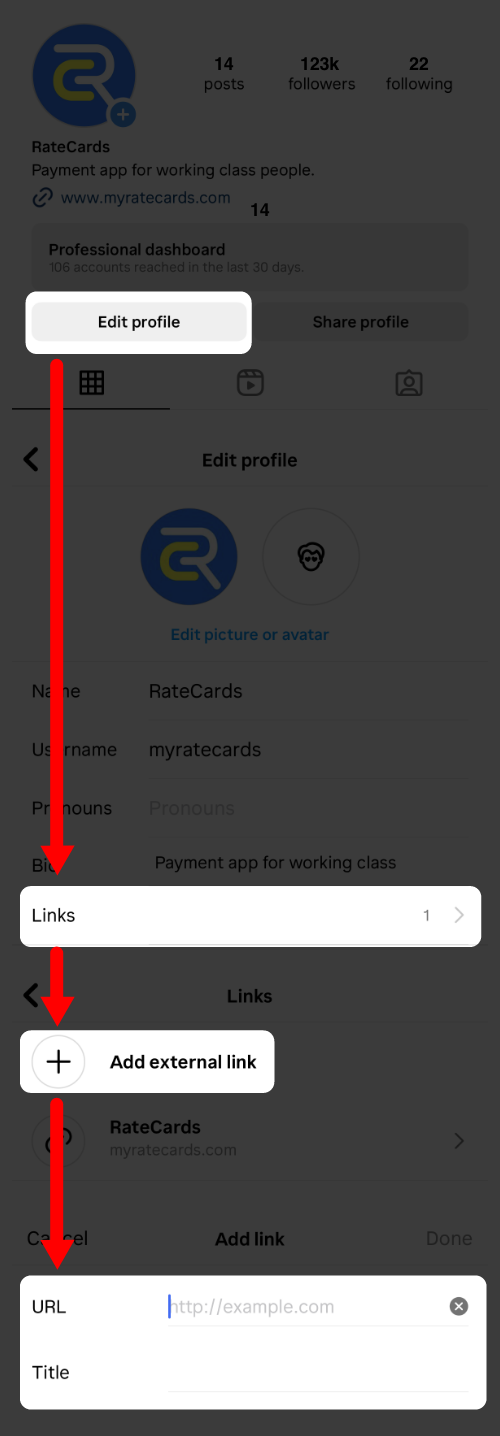
- Below your profile picture, tap the ‘Edit profile’ button
- In the ‘Edit profile‘ section; scroll to the ‘Links‘ section.
- Tap the ‘Links‘ text
- Next, select ‘Add external link‘
- Paste in the URL from your RateCards profile. in the ‘URL‘ text field. Learn more.
- In the ‘Title‘ text field; Type in the words ‘My RateCards‘
- Hit the ‘Done‘ button
FAQ
Can I share my RateCards link in a post?
Kinda. Add a photo (screengrab) of your RateCards profile, paste the link to your RateCards profile in the post caption.
How do I get more traffic from Instagram to my RateCards account?
Boosting your post in Instagram can drive more engagement and help sell your services. Follow Instagram’s rules for boosting a post.
Related Articles
How-Tos
YouTube: Add link-in-bio
TikTok: Add link-in-bio
Facebook: Add link-in-bio
LinkedIn: Add link-in-bio
X (Twitter): Add link-in-bio
Yelp Business: Add link-in-bio
Reddit: Add link-in-bio
Pinterest: Add link-in-bio
Create your profile
Add rate cards
Create custom invoice

Sell your side-hustle & freelance services

Product
Features
How it Works
Use Cases
Resources
Help Center
Getting Started
Earn w/ RateCards
Account Support
How-Tos
Company
About Us
Blog
Privacy Policy
Terms of Service
Contact Us